
Audiovisual instrument
VG Windscape
Play as you paint, paint as you play. Every breath is a sound and a brushstroke.
Thirty seconds of watching explains this better than the rest of the page.
An instrument that draws
An audiovisual instrument, not a visualiser watching the audio from outside. The picture is made by the same playing that makes the sound, from the same breath, at the same instant.
Breath is the brush
How hard you blow decides how wide the stroke is, how bright it burns and how far it travels. Notes decide where it lands and what colour it takes. Every controller you own can be pointed at something on the screen.
Which is why it feels like playing rather than like operating software. You already know how to do this.
Never the same twice
Nothing here is a preset animation running to a clock. The image comes out of what you actually played, so the same piece drawn twice gives two different pictures, in the way two performances of it are two performances.
Made to be shown
Full screen on a projector or a second monitor, with the controls detached into a window of their own so they stay on your laptop and out of the audience's way.
It runs beside the instrument rather than inside it, so however busy the picture becomes it cannot reach the sound.
Scenes that move on their own
Build a list of looks and the picture drifts between them while you play, gliding rather than cutting, on a timer or on a note. A long piece changes character without you touching anything.
Your own pictures
The brush paints out of photographs. A set comes with it, and you can point it at a folder of your own: your city, your paintings, your family, anything that has colour in it.
Record what happened
One button captures the picture together with the sound and saves a video file. That is how the clips you have seen were made, and it is the fastest way to have something worth posting after an evening of playing.
Draw something in the next minute
The visual part opens in Chrome and hears your controller straight away. Nothing to install, nothing to sign up for. If your controller is not to hand, press M and draw with the mouse.
Open the demoAn hour at a time, with a watermark, and you can start again as often as you like. Chrome is required.
The instrument itself
Everything in one window, with the picture one button away.
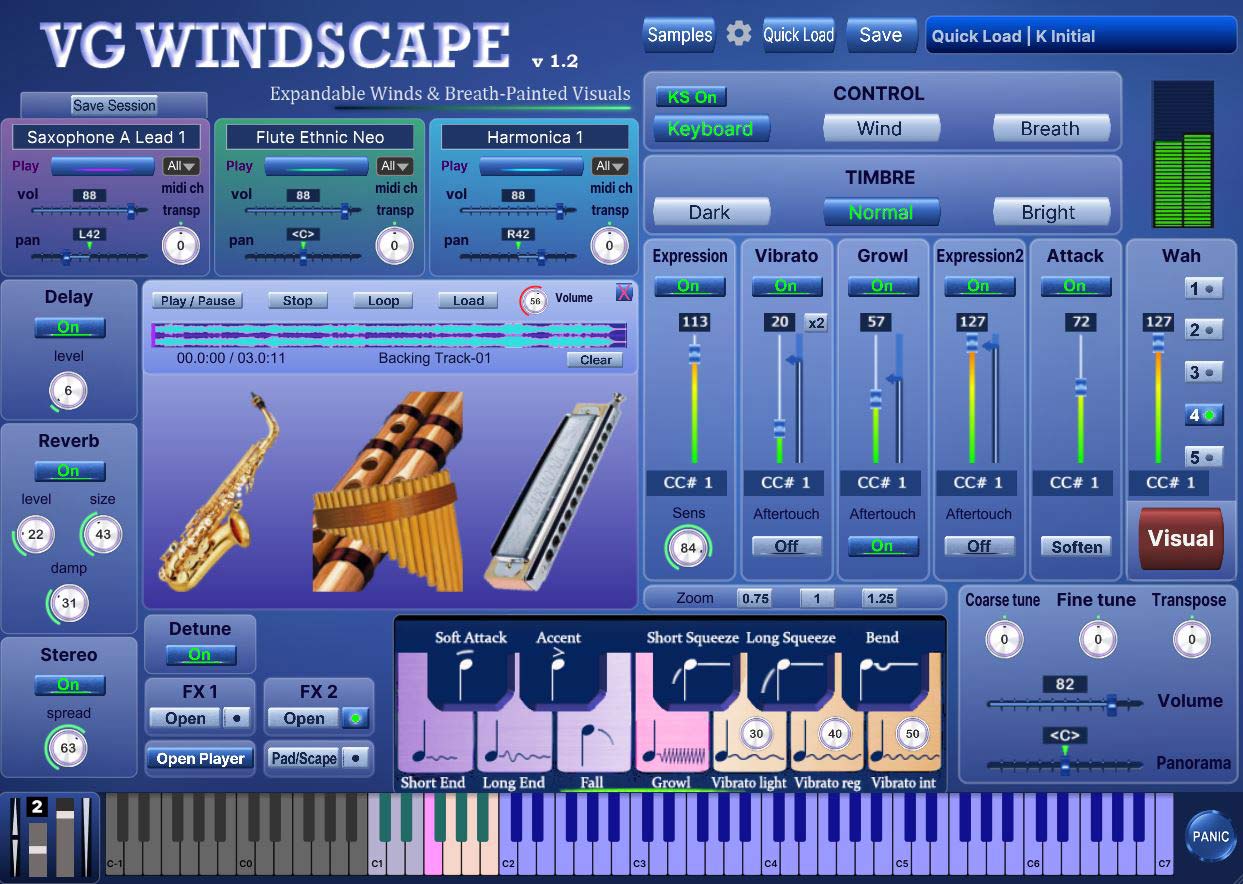
It grows with the sound collection
The instrument is not a closed box of sounds. It plays the whole VG library, and the library keeps growing.
Ninety sound sets, one folder
Every sound set in the VG Sound Collection plays in VG Windscape: saxophones, flutes, trumpets, harmonicas, strings, synths, the lot. The same files, in the same folder, that VG Wind Ensemble uses.
Sets are bought one at a time or in collections, and added whenever you like. Put the files in the sound folder and they are in the instrument next time it opens. Nothing is reinstalled and nothing is upgraded.
It works both ways
The thirteen pad sets that come with VG Windscape play in VG Wind Ensemble as well. Nothing is walled off in either direction, and nothing you own has to be bought twice.
If you already have VG sound sets on your computer, they are in VG Windscape the moment it is installed. There is no import step and no licence to move.
Ninety sound sets: winds and brass, flutes and harmonicas, strings, and a shelf of synths made for exactly this kind of playing. Any one of them can be the voice of the next picture.
Browse the sound collectionPerformance Demos
Real performances on different controllers. The sound and the picture both come from the playing.
Greaten AP-500 Pro
Tenor Sax
Greaten AP-500 Pro
Soprano Sax
MIDI Keyboard + TEControl
Harmon Mute Trumpet
WARBL2, Motion Steers the Brush
Harmonica
WARBL2
Ethnic Flute
Two ways to buy it
The program is the same in both. What differs is how many sound sets come with it.
One payment
VG Windscape
The instrument with its visual layer, and thirteen sound sets made for pads and textures.
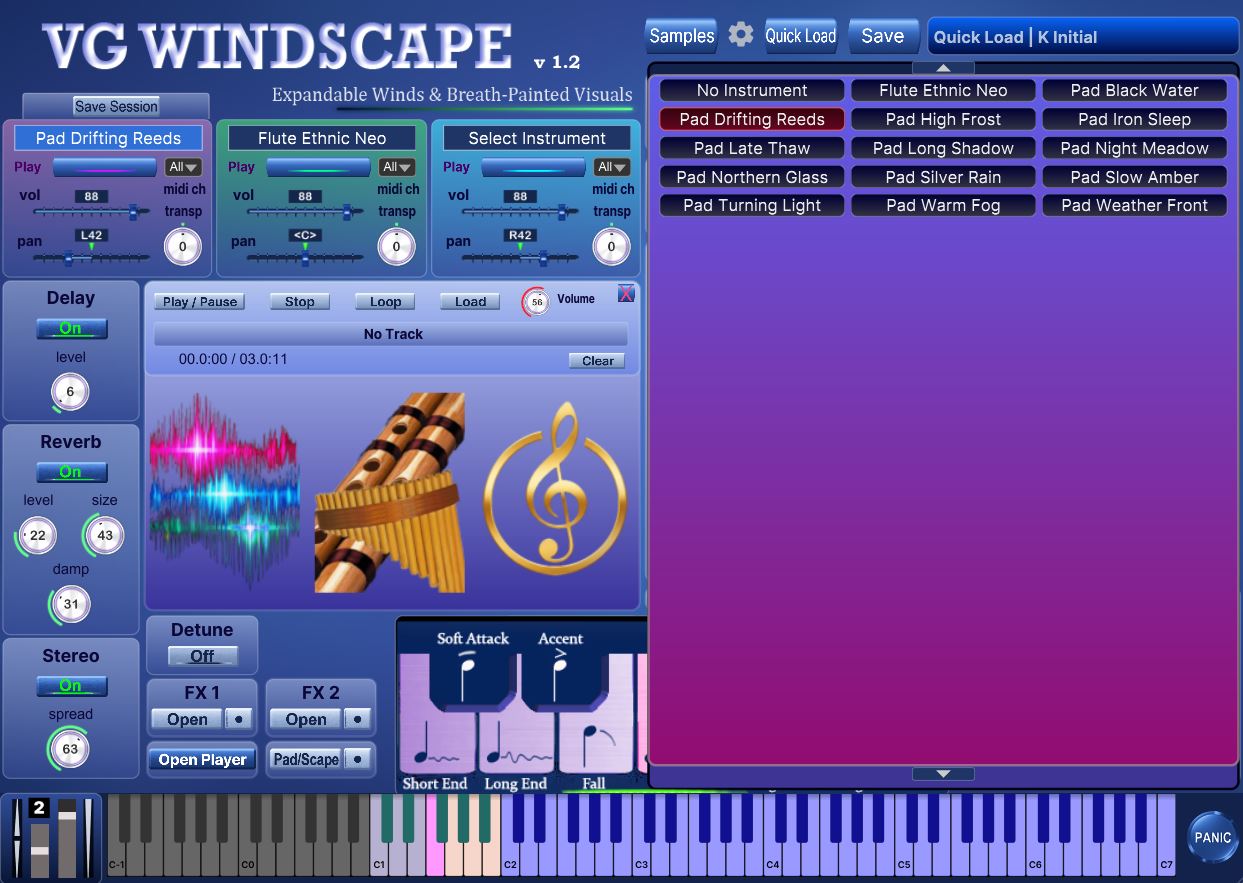
The thirteen sound sets
- Pad Late Thaw
- Pad Weather Front
- Pad Warm Fog
- Pad Slow Amber
- Pad Night Meadow
- Pad Iron Sleep
- Pad Silver Rain
- Pad Drifting Reeds
- Pad Turning Light
- Pad High Frost
- Pad Northern Glass
- Pad Long Shadow
- Pad Black Water
Windows and macOS, plugin and standalone. Updates to the visual layer are free.
One payment
VG Windscape + Complete Collection
The same instrument with the whole VG library: ninety sound sets, the thirteen pad sets among them.
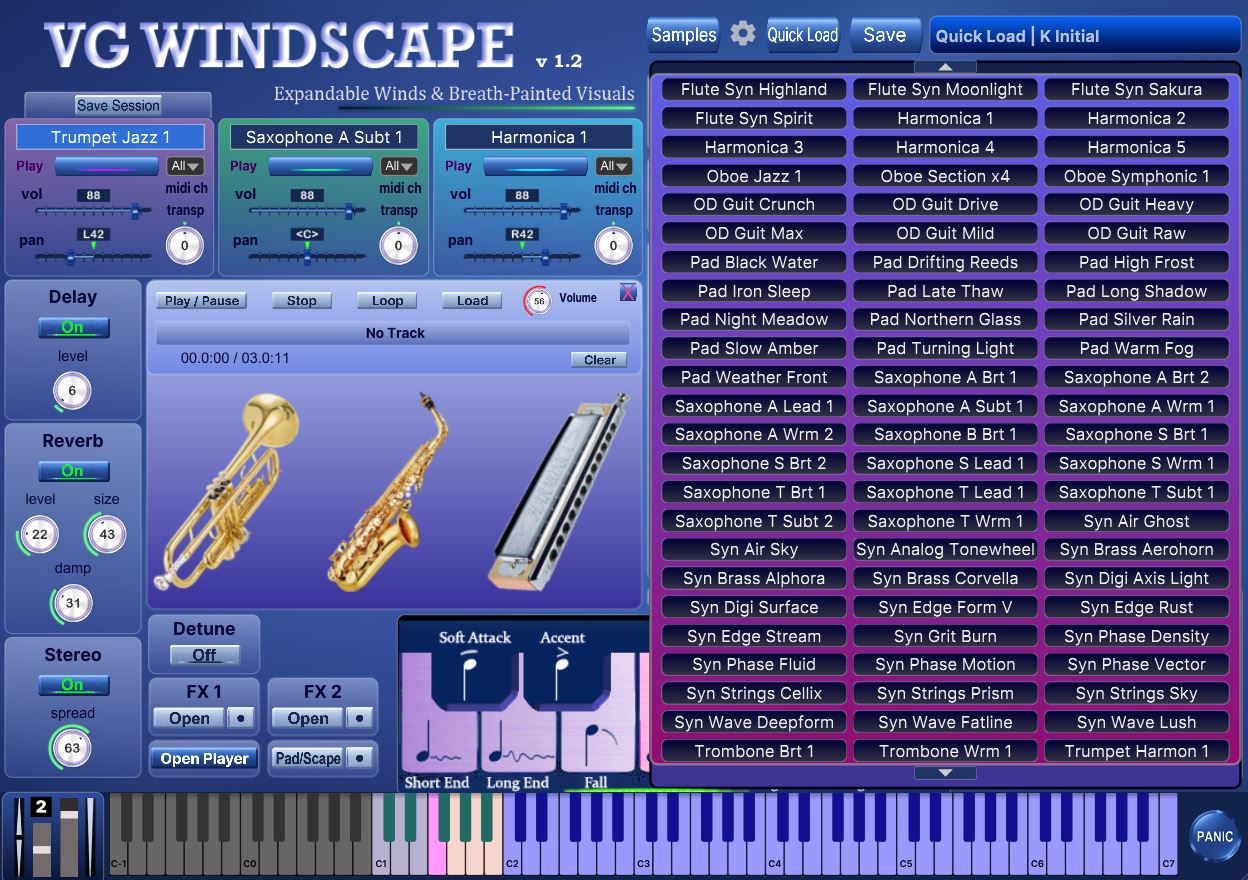
All ninety sound sets
- Pads and textures
- Pad Late Thaw
- Pad Weather Front
- Pad Warm Fog
- Pad Slow Amber
- Pad Night Meadow
- Pad Iron Sleep
- Pad Silver Rain
- Pad Drifting Reeds
- Pad Turning Light
- Pad High Frost
- Pad Northern Glass
- Pad Long Shadow
- Pad Black Water
- The VG Wind Ensemble collection
- Bass Clarinet
- Clarinet Bb Bright 1
- Clarinet Bb Warm 1
- Flugelhorn Warm 1
- Flute Ethnic Neo
- Flute Jazz 1
- Flute Syn Desert
- Flute Syn Highland
- Flute Syn Moonlight
- Flute Syn Sakura
- Flute Syn Spirit
- Harmonica 1
- Harmonica 2
- Harmonica 3
- Harmonica 4
- Harmonica 5
- OD Guit Crunch
- OD Guit Drive
- OD Guit Heavy
- OD Guit Max
- OD Guit Mild
- OD Guit Raw
- Saxophone Alto Bright 1
- Saxophone Alto Bright 2
- Saxophone Alto Lead 1
- Saxophone Alto Subtone 1
- Saxophone Alto Warm 1
- Saxophone Alto Warm 2
- Saxophone Baritone Bright 1
- Saxophone Soprano Bright 1
- Saxophone Soprano Bright 2
- Saxophone Soprano Lead 1
- Saxophone Soprano Warm 1
- Saxophone Tenor Bright 1
- Saxophone Tenor Lead 1
- Saxophone Tenor Subtone 1
- Saxophone Tenor Subtone 2
- Saxophone Tenor Warm 1
- Syn Air Ghost
- Syn Analog Tonewheel
- Syn Brass Alphora
- Syn Brass Aerohorn
- Syn Brass Corvella
- Syn Digi Surface
- Syn Edge Form V
- Syn Grit Burn
- Syn Phase Fluid
- Syn Phase Motion
- Syn Wave Fatline
- Trombone Bright 1
- Trombone Warm 1
- Trumpet Harmon muted 1
- Trumpet Jazz 1
- Trumpet Lead 1
- Trumpet Soul 1
- Trumpet Subtone 1
- Tuba Warm 1
- Cello Jazz 1
- Viola Jazz 1
- Violin Jazz 1
- Syn Air Sky
- Syn Digi Axis Light
- Syn Edge Rust
- Syn Edge Stream
- Syn Phase Density
- Syn Phase Vector
- Syn Strings Cellix
- Syn Strings Prism
- Syn Strings Sky
- Syn Wave Deepform
- Syn Wave Lush
- Oboe Jazz 1
- Oboe Symphonic 1
- Oboe Section x4
- Bassoon Jazz 1
- Bassoon Symph 1
- Bassoon Section x4
Everything VG Wind Ensemble has ever shipped, in one download.
Sound that can hold still
A picture that builds over a minute needs music that can wait for it. That is what the Pad/Scape side of the instrument is for.
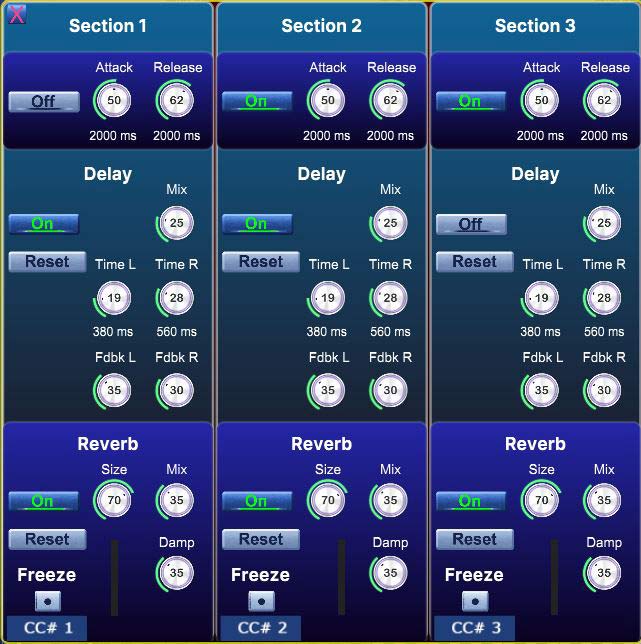
A wind instrument answers the breath and stops when the breath stops, which is right for melody and wrong for a landscape. Pad/Scape suspends that: the attack stretches to three seconds, the release with it, and one breath becomes a bed that keeps sounding while the image grows on top of it.
Each of the three layers has its own delay and reverb, and a freeze you work from the controller rather than from the screen.
Thirteen sound sets come with the instrument, made for exactly this: long, textured, unhurried.
What is in it
- The visual layer The drawing engine with its picture library, its presets, the scene system, video recording, and the settings panel that detaches into its own window. This is the part that keeps growing.
- Thirteen sound sets for pads and textures Built for long attacks and long tails rather than for fast lines.
- Everything VG Wind Ensemble does Windscape is built on the VG Wind Ensemble engine and keeps all of it: three instrument layers, breath and wind controller handling, keyswitches, harmonizer, portamento, the backing track player. On top of that come the visual layer and the pad side. The engine is shared; the sounds are its own.
- Everything you already own Any sound set from the VG collection loads in Windscape, and the thirteen pad sets load in VG Wind Ensemble. More about that above.
Why this is a new instrument
VG Wind Ensemble exists to sound like players breathing into real instruments, and that is what it is built around. VG Windscape uses the same engine for something else: it is made for drawing, and the sound is there to give the drawing a body.
That is a different instrument, an audiovisual one, not a newer version of the same. If you own Wind Ensemble you keep it exactly as it is, and what you gain here is a way to play pictures, plus thirteen sound sets that work in both.
What you need
For the picture
Google Chrome, which is the browser that lets a page listen to MIDI. Any graphics card of the last ten years. An internet connection once, the first time it opens, after which it works offline for good.
Chrome is what sets the floor for both halves: current versions of it need Windows 10 or later, or macOS 11 or later.
On macOS and on Windows 11 24H2 and later, nothing else. On Windows 10 there is one small free utility, so that the instrument and the picture can share a single controller.
For the instrument
Windows 10 64 bit or later, or macOS 11 and later. 8 GB of memory, more if you like long tails. An audio interface with ASIO on Windows, Core Audio on macOS.
A wind controller, a breath controller, an ordinary MIDI keyboard, or nothing at all if you only want to draw with the mouse.
Getting Started with VG Windscape
Short videos, one task each: the interface, your controller, and step by step setup.
Interface Overview: Every Panel in Three Minutes
Connect a Wind Controller
Play from a MIDI Keyboard
All the Picture’s Effects in Two Minutes
Play It in Your DAW: Plugin, Recording, Real Time Export
Windows 10: Sound and Picture on One Controller
Low Latency on Windows: ASIO, ASIO4ALL, Buffer
Install on Windows, Step by Step
How to Install on Mac
Order, Download, and Find Your Files
Questions people ask first
No. There is a keyboard mode that uses velocity and an envelope where breath would be, and you can draw with the mouse alone: press M, and pressing, dragging and releasing become the note, the breath and the end of it. A wind controller gives the finest control of both the sound and the picture, but nothing here is closed to you without one. Try the demo with whatever is on your desk right now.
No. Both are the same program, with the same visual layer, the same engine and no feature held back. The only difference is how many sound sets are in the box: thirteen, or all ninety. Sound sets can be added at any time afterwards, and they all load in either one.
Not in the usual sense: it is an audiovisual instrument. A visualiser listens to finished audio and reacts to it. Here the picture is made from your playing directly, from the breath and the notes, so it follows the intention rather than the loudness. What comes out is closer to drawing than to decoration.
Yes, all of them, and the thirteen pad sets work in VG Wind Ensemble too. They share one sound folder.
No. It needs a connection once, the first time the visual window opens, and after that it keeps its own copy and starts without a network.
Yes, they are yours. Recordings made in the demo carry a watermark; recordings from the full version carry a small mark in the corner and nothing else.
On macOS and on recent Windows 11, no: install, press Visual, play. On Windows 10 there is one extra step, because those versions let only one program listen to a controller at a time. The manual walks through it in three paragraphs.
VG Windscape
$59 with thirteen sound sets for pads and textures, or $340 with the whole VG library of ninety.
See prices