
VG Bassoon Virtual Instrument
Jazz bassoon, symphonic bassoon, and a four-bassoon section
Three sound sets running on the complete VG Wind Ensemble performance engine, playable and blendable in real time with wind controllers, breath controllers, and expressive MIDI keyboards.
Virtual Instrument, VST, AU plugins, standalone application.
Written for VG Bassoon: every control, effect and keyswitch, plus installation for Windows and macOS.
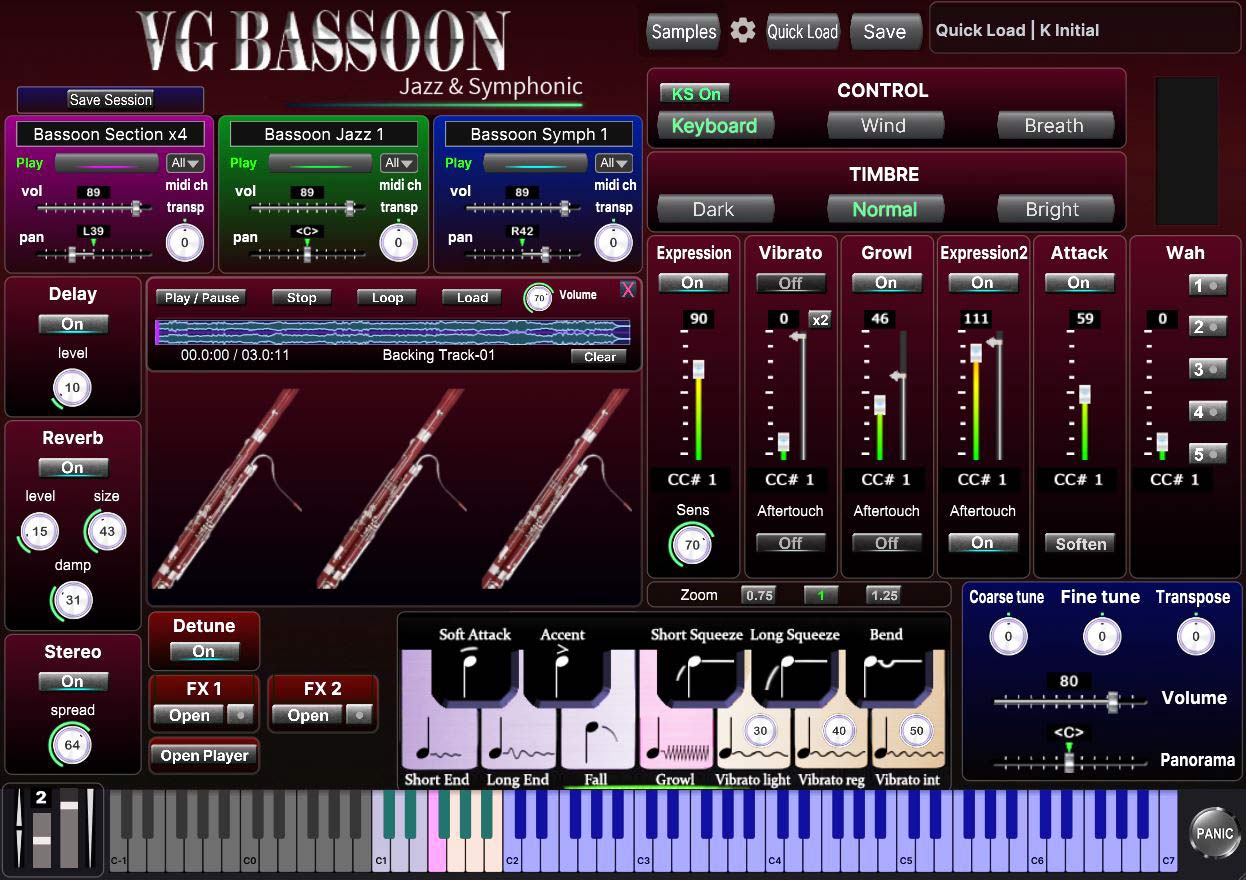

VG Bassoon Virtual Instrument
One instrument, three sound sets, the complete engine
VG Bassoon Virtual Instrument
The complete VG performance engine with three bassoon sound sets included. Load all three at once across the three instrument layers and morph between them live with breath, tilt, or any MIDI CC.
- Full performance engine, nothing removed
- All three sound sets included
- Windows and macOS, VST / VST3 / AU / standalone
- Instant download after purchase
- Free updates
Jazz, Symphonic, and a Section of Four
Each sound set loads into its own layer and can be blended with the others in real time
Bassoon Jazz 1
A brighter, more focused tone with a sharper, better defined attack. The reed comes through clearly and every note start lands, which is what a jazz line needs to be heard over a rhythm section.
Bassoon Symph 1
A warmer, rounder tone with a soft attack. It works as a symphonic solo voice, blends with the woodwind group, and carries the lyrical lines that bassoon writing is built around.
Bassoon Section x4
Four bassoons recorded at the same time. This weight suits modern styles of popular and classical music, where a single line needs the body of a whole section.
Special Offer for Existing Customers
A thank you to everyone already using VG instruments
VG Library Owners
If you already own any VG library, whether VG Wind Ensemble, VG Virtual Instruments, or a Kontakt version of our instruments, you can get VG Bassoon with a 20% discount. Write to us and we will send you a personal discount code.
Contact us at:
vgtrumpet@yahoo.com
Performance Demos
Real performances with different controllers
TEControl Breath Controller
VG Bassoon
MIDI Keyboard
VG Bassoon
Greaten AP-500 Pro Wind Controller
VG Bassoon
Features & Specifications
- Three bassoon sound sets included: Bassoon Jazz 1, Bassoon Symph 1, and Bassoon Section x4, loaded simultaneously across three independent instrument layers
- Works with Windows and Mac as a standalone and will run as a plugin in all major DAWs (Cubase, Logic Pro, Ableton Live, Reaper, FL Studio etc.) as VST/VST3/AU
- No Kontakt, no sampler and no other software required. VG Bassoon is a self-contained plugin and standalone application
- Compatible with breath controllers (AirMotion, TEControl, MRTAudio), wind controllers (AKAI EWI4000s, EWI5000, Solo, Roland Aerophone AE-10, AE-20, Pro AE-30, Yamaha WX, Yamaha YDS, Berglund NuEVI, NuRad, EMEO, Robkoo R1, Clarii mini, Greaten AP-500 Pro, DigiBrass Tilt, Tipsy etc.), and MIDI keyboard controllers
- Recorded sample quality: 24 bit / 44.1 kHz
- Installed library size: approximately 902 MB
- Custom designed, unique GUI
- Aftertouch, Mod Wheel, and Keyswitches are the key features to morph and perform sounds while playing
- Articulations: Falls, Squeezes, Soft attack, Accented attack, Bend
- Expressive effects: Expression, Attack, Vibrato, Growl, Wah
- Reverb, delay and stereo control to fit the instrument in every mix
- Additional effects: Portamento (smooth pitch glide between notes), Chorus (warm stereo width and depth), Phaser (sweeping frequency modulation), Filter (frequency shaping with real-time CC control), and Modulation (LFO-based pitch vibrato with adjustable rate and depth, controllable via MIDI CC)
- Morph Mixer: smoothly mixes and morphs between the three bassoon layers in real time using a MIDI CC controller. Assign any CC and move from a solo jazz tone through the symphonic voice into the full four-bassoon section without stopping the note
- VG EVI Keys: a built-in keyboard module for trumpet and brass players familiar with traditional valve fingering. Play a MIDI keyboard using the same three-finger valve technique with your right hand, just like on a real trumpet, while your left hand handles octave ranges only
- Harmonizer: adds harmony voices to the played note in real time. You can set the interval and blend level for each voice, turning a single bassoon line into a written-out reed section
- Live Monitor: on-screen bassoon artwork that responds to incoming CC data, so you can see exactly what your controller is sending while you play
- Backing Track Player: a player for backing tracks and minus-one recordings built directly into the instrument. Load a WAV, AIFF, FLAC or MP3 file straight from the interface and play bassoon over it without leaving the plugin and without opening anything else. Waveform display, play, pause, stop, a seek bar, loop, and an independent volume for the track
- Quick Load Browser: a fast in-app browser for switching the sound set on any layer without leaving the performance view
- Save Session: stores the complete current state of the instrument: loaded sounds, volumes, pans, transposes, and all effect settings. When you relaunch the standalone application, a prompt will offer to restore your last saved session
Getting Started with VG Bassoon
Installation on Windows and macOS
How to Install on Windows and macOS
Installation
Two steps, and nothing to copy by hand
Installation, step by step (Windows and macOS)
Windows
Step 1. Run the installer
Extract the installer archive and run the Setup.exe file inside it. Tick "Create a desktop shortcut" and complete the installation. The sound files are placed in C:\Program Files\VG Sound Collection\
Step 2. First launch, done once
Double-click the VG Bassoon desktop icon. The application will ask "Choose Sample Folder". Select C:\Program Files\VG Sound Collection\ then close and reopen the application. If the bassoons load, you are finished.
macOS
Step 1. Run the installer
Extract the installer archive and run the .pkg installer inside it, following the prompts. The sound files are placed in Macintosh HD / Library / Audio / VG Sound Collection /
Step 2. First launch, done once
Open the Applications folder and double-click VG Bassoon. The application will ask "Choose Sample Folder". Select Macintosh HD / Library / Audio / VG Sound Collection / then close and reopen the application. If the bassoons load, you are finished.
If something goes wrong
- The bassoons do not appear, or you see "can't be found". The sample path is not set correctly. Close the application and set the path manually in the LinkWindows file on Windows, or LinkOSX on macOS. The file sits in the VG Bassoon configuration folder:
Windows: C:\Users\[username]\AppData\Roaming\VG Trumpet\VG Bassoon\
macOS: ~/Library/Application Support/VG Trumpet/VG Bassoon/
Open it in a text editor. It holds one single line: the full path to your VG Sound Collection folder, with no quotes and no backslash at the end.
Windows example: C:\Program Files\VG Sound Collection
macOS example: /Library/Audio/VG Sound Collection
Correct the line, save the file, and start the application again. - No ASIO driver on Windows. Install ASIO4ALL from asio4all.org. In the audio settings select ASIO4ALL first, then switch back to your own ASIO driver.
- Keyswitches misfire when bouncing in a DAW. Use realtime export rather than offline bounce.
- Starting over. Delete the VG Bassoon configuration folder.
Windows: C:\Users\[username]\AppData\Roaming\VG Trumpet\VG Bassoon\
macOS: ~/Library/Application Support/VG Trumpet/VG Bassoon/
Delete only the VG Bassoon folder. The VG Trumpet folder above it holds the settings of your other VG instruments, so leave it alone.
Once the VG Bassoon folder is gone, run the installer again.
The ReadMe First file included with your download covers these in more detail. If you are still stuck, write to vgtrumpet@yahoo.com and we will sort it out.
System requirements
- Windows 7 or later (64-bit), or macOS 10.14 Mojave or later
- 8 GB RAM minimum
- Modern multi-core processor recommended
- ASIO-compatible audio interface on Windows, Core Audio on macOS
- VST, VST3, AU (64-bit), and standalone application
VG Bassoon FAQ
VG Bassoon is a standalone virtual instrument built on the same performance engine as VG Wind Ensemble, dedicated entirely to the bassoon.
It includes three bassoon sound sets (jazz, symphonic, and a four-bassoon section) loaded across three independent layers that can be blended and morphed in real time while you play.
No. VG Bassoon is a completely independent product with its own installer, plugin, and standalone application. Nothing else is required.
If you do own VG Wind Ensemble, the two can be installed side by side without any conflict.
VG Bassoon is a complete instrument dedicated to a single voice. All three bassoons are loaded across the three layers from the moment you open it, the interface is built around one instrument, and everything is ready to play with nothing to set up first.
In VG Wind Ensemble these bassoons are part of the larger paid collections, alongside dozens of other instruments. So if the bassoon is what you are after, VG Bassoon is the shortest and least expensive way to get it. If you want the whole multi-instrument platform, that is VG Wind Ensemble.
No. VG Bassoon is a dedicated single-instrument product and works with its three bassoon sound sets only.
If you want to load saxophones, trumpets, flutes, synths, and the rest of the collection in one engine, that is what VG Wind Ensemble is for.
All three sound sets are active at the same time. The Morph Mixer lets you assign any MIDI CC to crossfade between them: breath pressure, tilt, mod wheel, an expression pedal.
In practice this means a phrase can start as a single jazz bassoon, open into the symphonic tone as you push, and swell into a four-bassoon section at the top, all inside one held note and without switching patches.
VG Bassoon is designed for wind controllers (AKAI EWI, Roland Aerophone, Yamaha WX and YDS, Berglund NuEVI and NuRad, EMEO, Robkoo, Greaten, DigiBrass and others), breath controllers such as TEControl, AirMotion and MRTAudio, and expressive MIDI keyboards.
It also plays perfectly well from a standard MIDI keyboard using aftertouch and the mod wheel.
Nothing has to be copied by hand. The sound files come inside the installer and are placed in the VG Sound Collection folder for you.
Run the installer, then launch the application. On the first launch it asks "Choose Sample Folder", and you point it at that same folder:
- Windows: C:\Program Files\VG Sound Collection\
- macOS: Macintosh HD / Library / Audio / VG Sound Collection /
Close and reopen the application after that, and the bassoons will load. The full step-by-step is in the Installation section above.
There is no separate update file to look for. The installer in your account is always kept up to date automatically.
To update, log in at vgtrumpet.com/my-account/, go to the Downloads section, and download the installer again. Install it over your existing version, and your sound files and settings stay untouched.
The file does not display a version number, but whenever a new version is released it is replaced automatically in all user accounts.
Yes. Owners of any VG library, including VG Wind Ensemble, VG Virtual Instruments, and the Kontakt versions, can get VG Bassoon with a 20% discount.
Write to vgtrumpet@yahoo.com and we will send you a discount code.
If you have trouble downloading files, notice something missing, or need help getting started, please contact us at:
We'll be happy to help.
Where VG Bassoon Sits in the Collection
A continuation of the solo instrument line, on a new engine
VG Bassoon continues a line of solo instruments that already exists in the collection. Alongside it you will find trumpet, alto, tenor and soprano saxophones, harmonica, VG Oboe, and several others, as well as trio instruments that hold three instruments in one, such as trombone, flugelhorn and tuba.
What makes VG Bassoon different is the engine. Like VG Oboe, it is built on the full VG Wind Ensemble engine, so nothing has been left out: three independent layers, the Morph Mixer, the Harmonizer, the Live Monitor, the backing track player, all the effects, and VG EVI Keys.
If you would rather have everything in one place, with saxophones, trumpets, trombones, flutes, clarinets, harmonicas, strings, synthesizers and more in a single platform, take a look at VG Wind Ensemble.